
Risks, Drawbacks and Responsibilities with AI Usage
Last updated on 2026-01-19 | Edit this page
Overview
Questions
- What can go wrong when using AI coding assistants?
- What are my responsibilities as a developer when using AI?
- When is AI usage inappropriate or a no-go?
- What are the side effects of heavy AI reliance?
- Why do LLMs produce incorrect code and how can I avoid it?
Objectives
- Understand potential risks and pitfalls of AI-assisted coding
- Recognize your responsibilities as a developer using AI tools
- Identify scenarios where AI usage is inappropriate
- Learn strategies to mitigate risks and verify AI-generated code
- Develop awareness of long-term effects of AI dependence
- Apply best practices for responsible AI usage in coding
Introduction
While AI coding assistants like GitHub Copilot can significantly enhance productivity, they come with important risks, drawbacks, and responsibilities. Understanding these challenges is crucial for using AI tools effectively and ethically. This lesson explores what can go wrong, your responsibilities as a user, and how to navigate the complex landscape of AI-assisted development.
The Double-Edged Sword
AI coding assistants are powerful tools that can accelerate development, but they require careful use. Just as you wouldn’t use a power tool without understanding safety precautions, you shouldn’t use AI coding assistants without understanding their limitations and risks.
What Can Go Wrong?
1. Incorrect or Buggy Code
AI models can generate code that appears correct but contains subtle bugs:
Example:
R
# AI might suggest
remove_last <- function(data) {
  data[1:length(data) - 1]  # Bug: access of data[0] will cause an error
}

# Correct version
remove_last <- function(data) {
  data[1:(length(data) - 1)]  # Proper parentheses to ensure correct indexing
}
Why this happens:
- AI learns from patterns in training data, including buggy code
- AI doesn’t execute or test the code it generates
- Subtle logic errors are harder for pattern-matching to detect
2. Security Vulnerabilities
AI may suggest code with security flaws:
R
# INSECURE: AI might suggest
execute_query <- function(user_input) {
  query <- paste0("SELECT * FROM users WHERE name = '", user_input, "'")
  dbGetQuery(conn, query)  # SQL injection vulnerability!
}

# SECURE: Use parameterized queries
execute_query <- function(user_input) {
  query <- "SELECT * FROM users WHERE name = ?"
  dbGetQuery(conn, query, params = list(user_input))
}
Security risks include:
- SQL injection vulnerabilities (misuse/manipulation of the database request)
- Cross-site scripting (XSS) in web applications
- Hardcoded credentials or API keys
- Unsafe file operations
- Improper input validation
3. Inefficient or Non-Performant Code
AI may suggest code that works but performs poorly:
R
# INEFFICIENT: AI might suggest
calculate_means <- function(data) {
  results <- list()
  for(i in 1:ncol(data)) {
    results[[i]] <- mean(data[, i])
  }
  return(unlist(results))
}

# EFFICIENT: Vectorized approach
calculate_means <- function(data) {
  colMeans(data)
}
4. License and Copyright Issues
AI models are trained on public code repositories, which may include:
- Code with restrictive licenses (e.g. GPL)
- Proprietary code that shouldn’t have been public
- Code with unclear licensing
Risks:
- Inadvertently incorporating GPL code into proprietary projects
- Note: GPL requires derivative works to also be GPL
- Copyright infringement claims
- License compliance violations
Your Responsibilities as an AI User
When using AI coding assistants, it is your responsibility to ensure code quality, security, and legality. It is important to remember that AI is a tool to assist you, not a substitute for your expertise and judgment. Thus, you have to regard AI suggestions with the same scrutiny as code from any other source.
With AI usage, your role changes from sole author to supervisor and validator of AI-generated code!
1. Code Ownership and Accountability
You are ultimately responsible for all code in your project, regardless of whether it was written by you or suggested by AI.
This means:
- You must understand every line of code you commit
- You are accountable for bugs, security issues, and performance problems
- You cannot blame the AI if something goes wrong
- You must be able to explain and defend your code choices
2. Verification and Testing
Especially when it comes to the generation of complex functions or algorithms, never blindly accept AI suggestions. Always verify through testing. This should be standard practice anyway, but is especially critical with AI-generated code.
R
# Example verification workflow
ai_suggested_function <- function(data) {
  # [AI-generated code here]
}

# REQUIRED: Create comprehensive tests
test_that("ai_suggested_function works correctly", {
  # Test normal cases
  expect_equal(ai_suggested_function(c(1, 2, 3)), expected_result)

  # Test edge cases
  expect_error(ai_suggested_function(NULL))
  expect_equal(ai_suggested_function(c()), expected_empty_result)
  expect_equal(ai_suggested_function(c(NA, 1, 2)), expected_with_na)

  # Test performance for large inputs
  large_data <- rep(1:1000, 1000)
  expect_lt(system.time(ai_suggested_function(large_data))[3], 1.0)
})
Note, creating test code is another area where AI can assist you very efficiently, but you must still verify the tests themselves and check if they cover all relevant cases.
3. Security Awareness
You must:
- Review all AI-generated code for security vulnerabilities
- Never include sensitive data in prompts to AI tools
- Understand that code sent to cloud-based AI may be logged or used for subsequent training and answering
- Follow security best practices even when AI suggests otherwise
Data Privacy Alert
When using cloud-based AI assistants:
- Your code snippets are in most cases sent to external servers
- Avoid including passwords, API keys, or sensitive data
- Check your organization’s policies on AI tool usage
- Consider using local AI models for sensitive projects
When AI Usage Is a No-Go
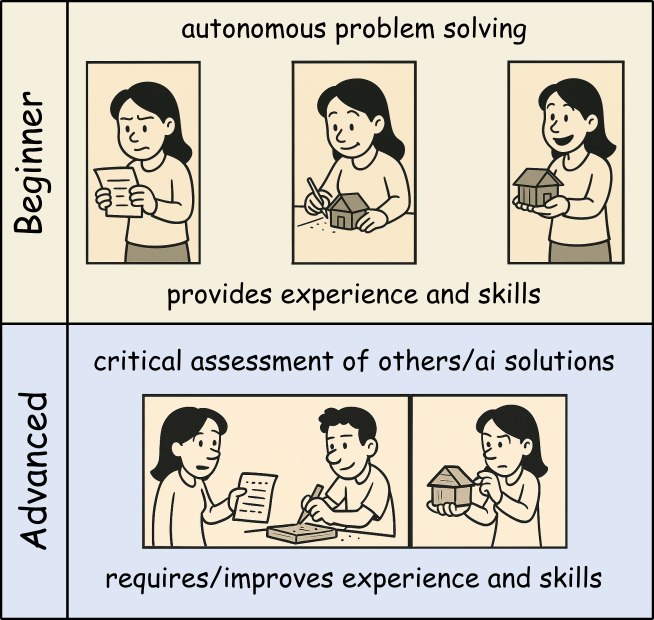
The easiness of using AI coding assistants can tempt developers to use them inappropriately. Especially if you are new to programming or a specific domain, it can be hard to judge when AI usage is acceptable and when not.
Thus, beginners should use AI tools as a personal learning assistant to get hints and explanations, but avoid using them to generate complete solutions for critical tasks you cannot yet judge properly yourself. That way, you can build up your own expertise boosted by AI help without becoming overly dependent on it.
Once you mastered the basics and can read and understand code well, you can start using AI more freely to broaden your productivity and understanding. Still, always be cautious when using AI for critical tasks beyond your expertise.
1. Specialized or Novel Algorithms
Be cautious with:
- Cutting-edge research implementations
- Domain-specific algorithms not well-represented online
- Novel statistical methods
- Proprietary business logic
Why: AI training data may not include correct implementations of specialized techniques.
2. Learning Fundamentals
Don’t use AI when:
- When not familiar with a new programming language
- You have no time or interest in understanding basic concepts and getting further explanations
- Completing academic assignments (unless explicitly allowed)
- Building foundational skills
Why: You need to develop core competencies yourself.
Side Effects of Heavy AI Reliance
1. Skill Atrophy
Long-term risks:
- Reduced ability to write code from scratch
- Weakened problem-solving skills
- Decreased understanding of fundamentals
- Dependency on AI availability
Example:
A developer who always uses AI for basic tasks may struggle when:
- Working offline
- Debugging complex issues
- Interviewing for new positions
- Mentoring junior developers
2. Reduced Code Understanding
Consequences:
- Difficulty maintaining code you didn’t write or understand
- Inability to debug when issues arise
- Challenges explaining code to colleagues
- Problems adapting code to changing requirements
3. Homogenization of Code
Problems:
- Repetition of common mistakes or old patterns/approaches
- Loss of creative problem-solving approaches
- “Cargo cult” programming (copying without understanding)
4. False Confidence
Dangers:
- Overestimating code quality because it “looks professional”
- Underestimating testing needs
- Reduced code review rigor
- Faster development at the cost of quality
Maintaining Skills While Using AI
Balance is key:
- Set aside time for coding without AI assistance
- Practice fundamental skills regularly
- Review and understand all AI-generated code
- Explain solutions to others to test your understanding
Why LLMs Produce Wrong Code
1. Pattern Matching, Not Understanding
LLMs don’t “understand” code:
- They predict likely token sequences based on training data
- They don’t execute code mentally to verify correctness
- They don’t reason about edge cases
- They replicate patterns even when inappropriate
Example:
R
# AI might suggest this pattern because it's common
calculate_average <- function(x) {
  sum(x) / length(x)  # Fails with NAs!
}

# But context might require
calculate_average <- function(x) {
  mean(x, na.rm = TRUE)  # Handles NAs correctly
}
2. Training Data Limitations
Issues with training data:
- Contains buggy code from public repositories
- May be outdated (not current best practices)
- Overrepresents certain languages and frameworks
- May include deprecated or insecure patterns
3. Context Window Limitations
LLMs have limited context:
- Can’t see entire project structure
- Miss important constraints from other files
- Don’t know your specific requirements
- Lack domain-specific knowledge
4. No Execution or Testing
Critical limitation:
- AI generates code but doesn’t run it
- No feedback loop from actual execution
- Can’t verify correctness through testing
- Doesn’t catch runtime errors
Challenge: Prompt Engineering for Better Code
Try improving AI-generated code quality by refining your prompts. Compare results:
Poor prompt:
Write a function to process data
Better prompt:
Write an R function that filters a data frame to include only rows where the ‘value’ column is positive and non-NA. Include input validation, error handling, and roxygen2 documentation.
Try both prompts with your AI assistant. How do the results differ?
Poor prompt typically produces:
- Generic, vague code
- No error handling
- No documentation
- Assumes undocumented column names
- Doesn’t handle edge cases
Better prompt typically produces:
- More specific, targeted code
- Input validation
- Documentation
- Explicit handling of requirements
- Better edge case coverage
Key lessons:
- Specific prompts → better results
- State requirements explicitly
- Request error handling and documentation
- Mention edge cases you care about
- Specify coding standards or style
But remember: Even with great prompts, always verify the output!
How to Avoid AI-Generated Errors
1. Adopt a Verification Mindset
Question everything:
R
# When AI suggests code, ask yourself:
# - Do I understand what this does?
# - What are the assumptions?
# - What could go wrong?
# - Are there edge cases?
# - Is this efficient?
# - Is this secure?
2. Prompt Engineering
Improve AI suggestions by extended initial prompts:
- Describe the general requirements (what packages to use, coding style, version constraints, etc.)
- Give details about the data structures involved
- Describe the coding task in detail
- Define critical edge cases (or request handling of edge cases)
- Request documentation and comments for clarity and subsequent maintenance
In some AI systems, general requirements can be provided as system prompts or initial context to guide all subsequent suggestions.
Best Practices for Responsible AI Usage
1. The 80/20 Rule
Use AI for the 80% of straightforward, repetitive tasks. Reserve human expertise for the critical 20% involving:
- Complex algorithms
- Security-sensitive code
- Performance optimization
- Architectural decisions
- Domain-specific logic
2. Treat AI as a Junior Developer
Think of AI as a smart but inexperienced assistant:
- It needs clear instructions
- It requires supervision
- Its work must be reviewed
- It shouldn’t handle critical tasks alone
- It can help with routine work
3. Document AI Usage
R
# Consider adding comments for transparency
#' Calculate weighted average
#'
#' This function was initially drafted with AI assistance
#' and subsequently reviewed, tested, and validated.
#'
#' @param values Numeric vector of values
#' @param weights Numeric vector of weights
#' @return Weighted average
calculate_weighted_avg <- function(values, weights) {
  # Implementation here
}
4. Continuous Skill Development
Maintain your skills:
- Practice coding without AI regularly
- Study algorithms and data structures
- Read high-quality code from experts
- Contribute to code reviews
- Teach others what you learn
5. Stay Informed
AI capabilities and limitations change rapidly:
- Follow updates to tools you use
- Learn about new AI capabilities
- Understand evolving best practices
- Participate in communities discussing AI use
Group Discussion
Within the session we want to discuss some of the following questions:
What are your “tricks” to check for and deal with wrong answers of the AI?
How do you know/decide whether AI usage is allowed/ok and when not?
Are policies (of organizations, employers, …) a sufficient guide regarding AI use?
Honestly, do you think AI usage helps to increase your skills or is a tempting way to reduce your learning/understanding efforts? Or do you have examples for both? If so, what makes the difference?
So think about them and make some notes of your thoughts and ideas!
Legal and Ethical Considerations
Copyright and Licensing
Key concerns:
- AI-generated code may resemble copyrighted code
- Unclear legal status of AI-generated content
- License compatibility issues
- Potential copyright infringement
Best practices:
- Understand your organization’s AI usage policies
- Check licenses of suggested dependencies
- Document AI usage for legal compliance
- Consult legal counsel for commercial projects
Privacy and Data Protection
Considerations:
- Code sent to AI services may be stored
- Proprietary algorithms might be leaked
- Sensitive data in code could be exposed
- Compliance with GDPR, HIPAA, etc.
Mitigation:
- Use local AI models for sensitive code
- Anonymize data in examples sent to AI
- Review AI service terms of service
- Follow organizational data policies
Conclusion
AI coding assistants are powerful tools that can enhance productivity, but they come with significant responsibilities. Success requires:
- Awareness of what can go wrong
- Responsibility for all code you commit
- Judgment about when AI is appropriate
- Verification of all AI suggestions
- Balance between AI assistance and skill development
- Ethics in how you use and disclose AI usage
Remember
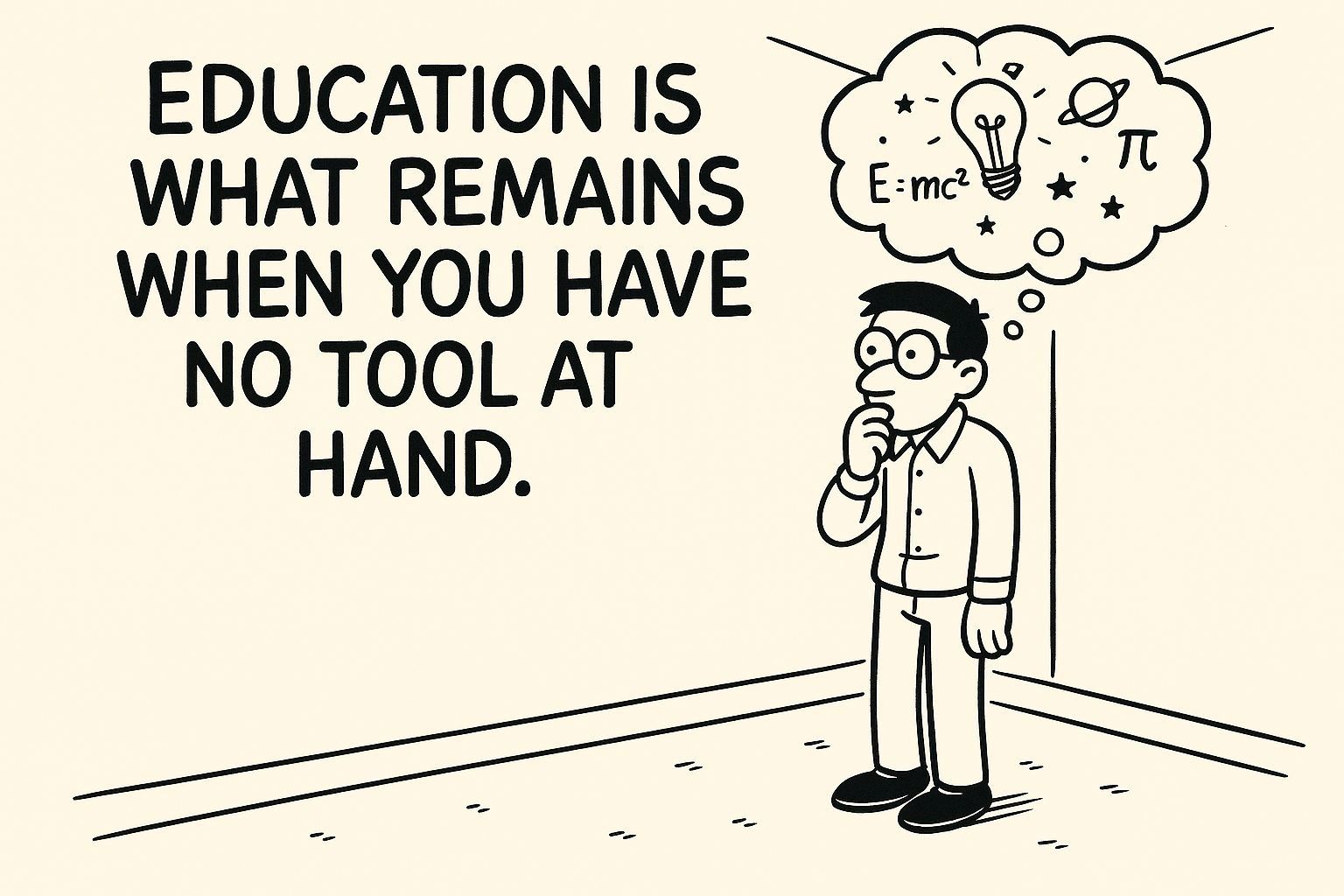
AI is a tool, not a replacement for human expertise, judgment, and responsibility. Use it wisely, verify everything, and never stop learning.
- AI can generate incorrect, insecure, or inefficient code - always verify
- You are fully responsible for all code you commit, regardless of AI involvement
- AI usage is inappropriate for critical systems, novel algorithms, and learning fundamentals
- Heavy AI reliance can lead to skill atrophy and reduced code understanding
- LLMs produce wrong code because they pattern-match rather than understand
- Comprehensive testing, code review, and iterative refinement are essential
- Balance AI productivity gains with maintaining your programming skills
- Consider legal, ethical, and privacy implications of AI tool usage
- Treat AI as a junior assistant requiring supervision, not an expert to trust blindly
- Responsible AI usage requires continuous learning and critical thinking