
Understanding and Setting LLM Parameters
Last updated on 2026-01-19 | Edit this page
Estimated time: 40 minutes
Overview
Questions
- How do large language models generate responses?
- What parameters control LLM behavior?
- How can I adjust LLM parameters to improve result quality?
- How do I set parameters when using
ellmer?
Objectives
- Understand how LLMs generate text through token probability
- Learn the difference between deterministic and random outputs
- Configure temperature, top_k, top_p, and seed parameters
- Apply parameter settings in
ellmerfor better results - Follow best practices for AI-driven data processing
Introduction
When working with large language models (LLMs) like GitHub Copilot, understanding how these models generate responses and how to control their behavior is essential for getting consistent, high-quality results. This episode explores the inner workings of LLMs and the parameters you can adjust to guide their output.
How LLMs Generate Responses
Large language models generate text through a process called autoregressive token generation. Let’s break down what this means:
Token-by-Token Generation
- Input Processing: The model receives your prompt and converts it into tokens (words or word pieces)
- Probability Calculation: For each position, the model calculates probability scores for all possible next tokens
- Token Selection: A token is selected based on these probabilities
- Iteration: The selected token is added to the sequence, and the process repeats
This means that each word (or token) in the response is chosen based on:
- The original prompt
- All previously generated tokens
- A probability distribution over the vocabulary
Deterministic vs. Random Generation
The way a model selects tokens has a significant impact on the quality and consistency of results.
Deterministic Generation
- Always selects the highest probability token
- Produces consistent, reproducible results
- Useful for tasks requiring reliability (e.g., code generation, data extraction)
- Can be repetitive or lack creativity
Random (Stochastic) Generation
- Samples from the probability distribution
- Produces varied, creative results
- Useful for content generation, brainstorming
- Results may be inconsistent across runs
- Can occasionally produce unexpected or incorrect outputs
The parameters we’ll discuss control this balance between deterministic and random behavior.
Key LLM Parameters
Temperature
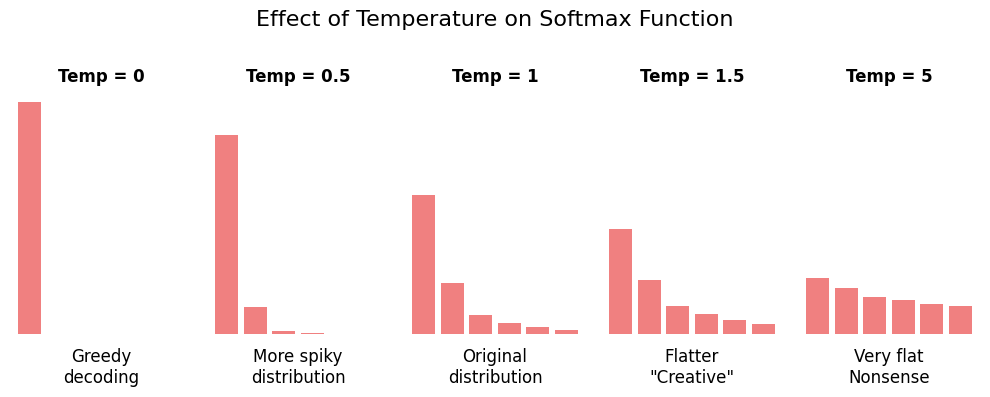
Temperature controls the randomness of token selection by adjusting the probability distribution.
-
Low temperature (e.g., 0.0-0.5):
- Sharpens the distribution (high-probability tokens become even more likely)
- More deterministic and focused outputs
- Better for factual tasks, code generation, data processing
-
High temperature (e.g., 0.8-1.5):
- Flattens the distribution (gives lower-probability tokens more chance)
- More creative and diverse outputs
- Better for creative writing, brainstorming
Top-K Sampling
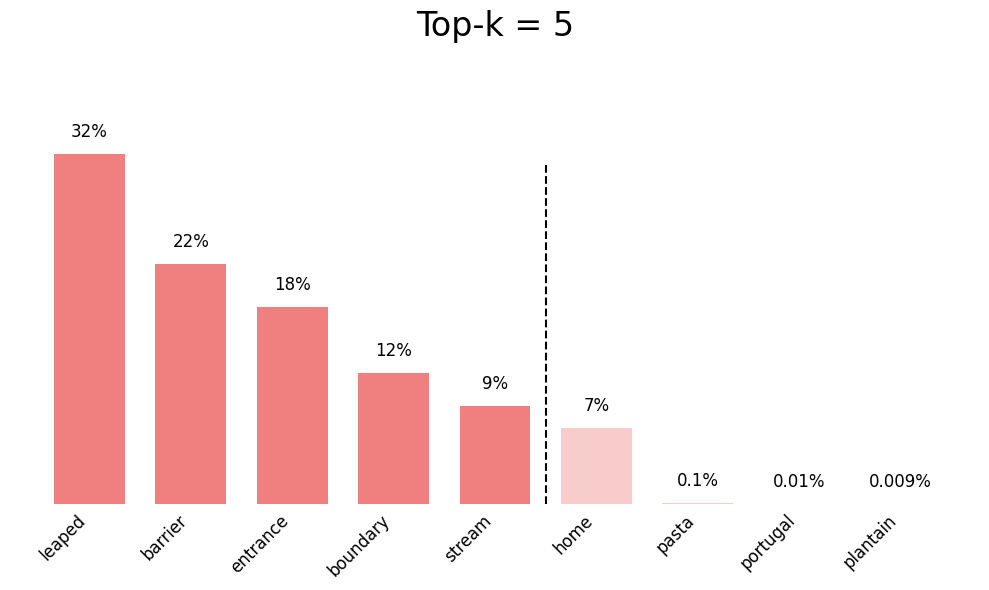
Top-K limits the selection to the K most probable tokens.
- Only the top K tokens with highest probability are considered
- All other tokens are given zero probability
- Reduces the chance of selecting very unlikely tokens
- Helps prevent nonsensical outputs
For example, with top_k = 50:
- Only the 50 most likely tokens can be selected
- The other thousands of tokens are excluded
- The model samples randomly among these 50 tokens (influenced by temperature)
Top-P Sampling (Nucleus Sampling)
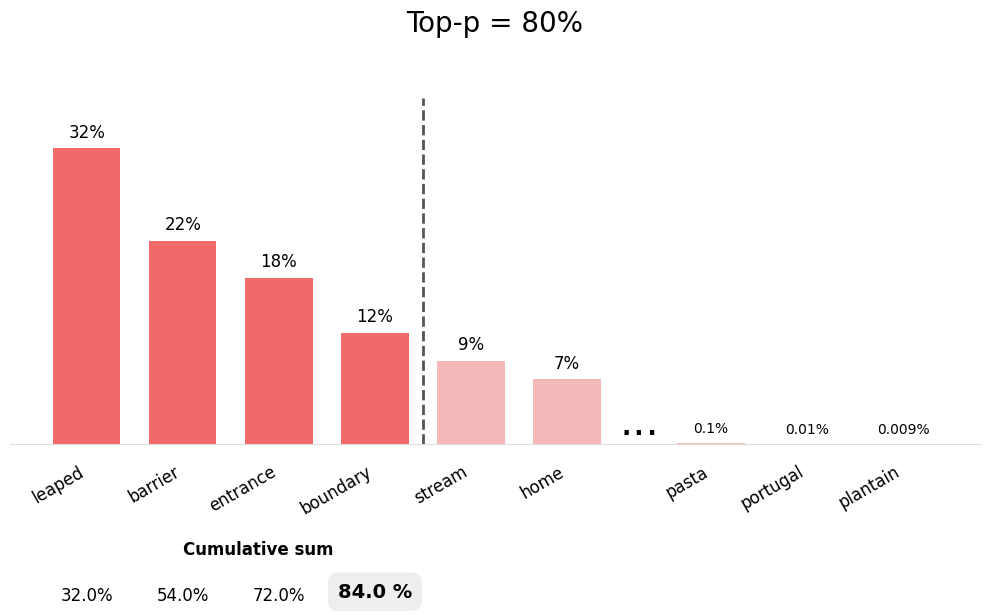
Top-P (also called nucleus sampling) selects from the smallest set of tokens whose cumulative probability exceeds P.
- Dynamically adjusts the number of tokens considered
- More adaptive than top-K
- With
top_p = 0.9, tokens are selected until their cumulative probability reaches 90%
The advantage of top-P over top-K:
- When the model is confident (one token has high probability), fewer tokens are considered
- When the model is uncertain (probabilities are spread out), more tokens are considered
- This adapts better to different contexts
Seed
Seed controls the random number generator for reproducible results.
- Setting the same seed with the same prompt produces identical outputs
- Useful for debugging and testing
- Enables reproducible research
- Note: Different model versions may still produce different results even with the same seed. Furthermore, model internal effects due to parallelization etc. might also cause minor differences.
Setting Parameters in ellmer
The ellmer package provides the params()
function to configure LLM parameters. Here’s how to use it:
Parameter Settings for Different Tasks
Viewing Current Parameters
You can check the parameters being used by a chat object:
R
# Create chat with parameters
chat <- chat_github(params = params(temperature = 0.3))

# The chat object will show the configured parameters when printed
print(chat)
Parameter Availability
Not all LLM providers support all parameters. GitHub Copilot models typically support:
temperaturetop_p-
seed(may vary by model)
Parameter support may vary depending on your ellmer version and the specific model provider. Check the ellmer documentation for the most up-to-date information on parameter support for your version.
Challenge 1: Experiment with Temperature
Create two chat sessions with different temperature settings and compare their outputs for repeated calls:
- For the following prompt: “Name with one word an animal that fits
the following description ‘It has sharp teeth and a long tail’”
- do the prompt individually for temperature 0.1 and 2.0
- repeat the model creation and prompting 3 times each
- Compare the creativity and variety of responses
Which temperature setting would you use for your research and in which context?
R
library(ellmer)

for ( i in 1:3) {
  # Low temperature - deterministic
  llm <- chat_github(params = params(temperature = 0.1))
  llm$chat("Name with one word an animal that fits the following description 'It has sharp teeth and a long tail'")
  # High temperature - creative
  llm <- chat_github(params = params(temperature = 2.0))
  llm$chat("Name with one word an animal that fits the following description 'It has sharp teeth and a long tail'")
}
Discussion:
- The low temperature setting will likely produce more conventional, safe suggestions and repetition (reproducability) is higher
- The high temperature setting may produce more creative but potentially less practical names
- For research, you might want to stick with deterministic model setups in order to keep your results reproducible and sound
Best Practices for AI-Driven Data Processing with ellmer
When using LLMs for data processing tasks, follow these guidelines to ensure reliable and reproducible results:
1. Use Low Temperature for Consistency
R
# For data classification, extraction, or transformation
chat <- chat_github(
  params = params(
    temperature = 0.2,  # Consistent outputs
    seed = 123          # Reproducibility
  )
)

# Process data
data %>%
  rowwise() %>%
  mutate(category = chat$chat(paste("Classify:", text)))
2. Set Seeds for Reproducible Research
R
# Document your parameters in your analysis script
ANALYSIS_PARAMS <- params(
  temperature = 0.3,
  top_p = 0.85,
  seed = 42  # Document this in your README
)

chat <- chat_github(params = ANALYSIS_PARAMS)
3. Test Parameter Settings on Sample Data
R
# Test on a small sample first
sample_data <- data %>% slice_sample(n = 10)

# Try different parameter settings
params_conservative <- params(temperature = 0.1, seed = 1)
params_balanced <- params(temperature = 0.5, seed = 1)

# Compare results before processing full dataset
4. Document Parameter Choices
R
# Save metadata with your processed data
processing_metadata <- list(
  date = Sys.Date(),
  model = chat$get_model(),
  parameters = list(
    temperature = 0.3,
    top_p = 0.9,
    seed = 123
  ),
  ellmer_version = as.character(packageVersion("ellmer"))
)

# Save with your results
output <- list(
  data = processed_data,
  metadata = processing_metadata
)
write_rds(output, "processed_data_with_metadata.rds")
Reflection: Parameter Trade-offs
Consider these questions:
- When might you want to prioritize creativity over consistency?
- How do parameter settings affect the interpretability of AI-processed data?
- What are the implications of using low vs. high temperature for scientific reproducibility?
- How should parameter choices be documented in published research?
Parameter Selection Guidelines
Here’s a quick reference for choosing parameter values:
| Task Type | Temperature | Top-P | Seed | Reasoning |
|---|---|---|---|---|
| Code generation | 0.1-0.3 | 0.8-0.9 | Yes | Need deterministic, correct syntax |
| Data classification | 0.1-0.2 | 0.8 | Yes | Consistency is critical |
| Text extraction | 0.2-0.4 | 0.85 | Yes | Balance accuracy and flexibility |
| Content summarization | 0.3-0.5 | 0.9 | Optional | Some creativity helps |
| Creative writing | 0.7-1.0 | 0.95 | No | Maximize diversity |
| Brainstorming | 0.8-1.2 | 0.95 | No | Want unexpected ideas |
- LLMs generate text through repeated token probability calculations and random selection
- Temperature controls the randomness of outputs: low values are more deterministic, high values are more creative
- Top-K and top-P sampling limit token selection to reduce nonsensical outputs
- Seeds enable reproducible results when using the same prompt and parameters
- Use
params()in ellmer to configure temperature, top_p, seed, and other parameters - For data processing, use low temperature (0.1-0.3) and set seed for reproducibility
- Document parameter choices and model versions for transparent, reproducible research
- Test parameter settings on sample data before processing full datasets
- Combine appropriate parameters with clear prompts for best results